The new Omega AutoTactics feature will be added to the game in Unity client only. It will be part of the Premium subscription.
You can use this assistance system to enable automatic ship combat control and loot collection operations.
You need to activate a Premium subscription to unlock access to this feature.
You can activate Omega AutoTactic via hotkey F12.
When Omega AutoTactic is active, it can be interrupted by active and passive actions.
Active interruption:
- Use the action bar
- Select a target
- Move the ship
Passive interruption:
- Disconnection
- Ship crashed
Omega AutoTactic is only available on the Unity client!
Auto Combat
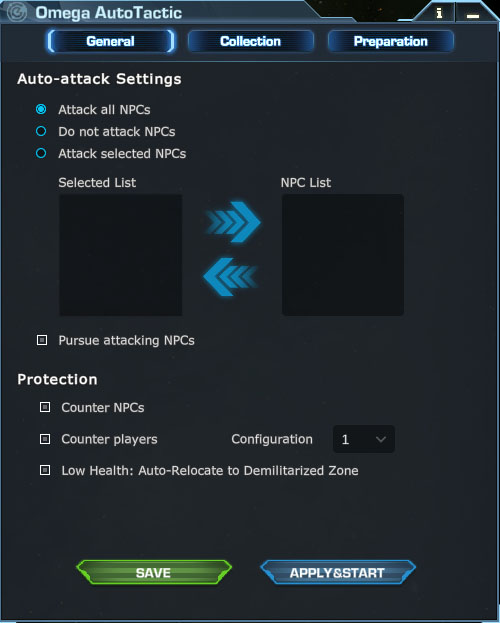
During Auto Combat, you can configure the attack target settings for your ship, including options to attack all NPCs, target specific NPCs or disable NPC attacks entirely.
When you choose to attack specific NPCs, you can select from the NPCs existing on the specific map.
You can also configure if you want to counterattack NPCs and other players when they attack you. Furthermore, you can determine a specific ship configuration to activate when counterattacking another player.
Loot Collection
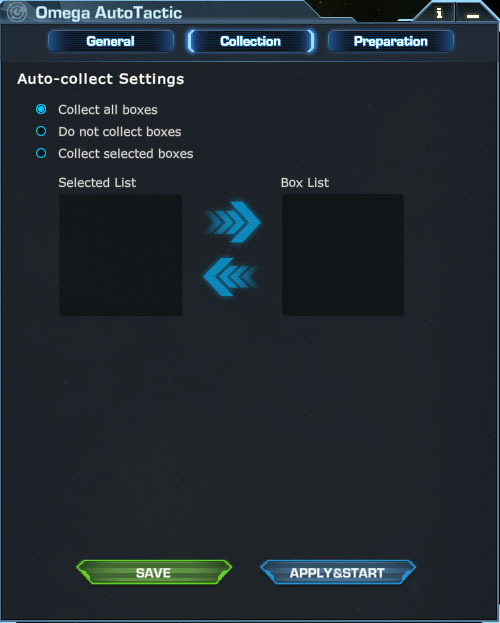
You can configure 3 pickup modes: Collect all boxes, collect specific boxes, or disable auto-collect.
When you select “collect specific boxes”, you may choose items from the current map’s available boxes.
Ammunition & Skill
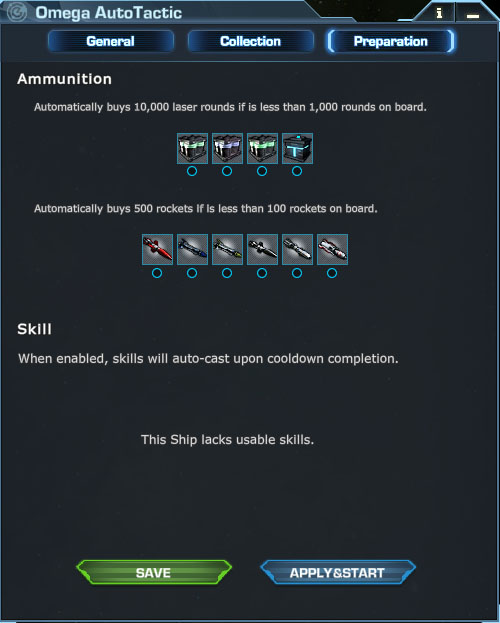
You can configure the Auto-buy Ammunitions feature to automatically purchase selected ammunition when your current stock is running low. With the mult-selection you can choose multiple options, including: LCB-10, MCB-25, MCB-50, SAB-50, R-310, ECO-10, HRSTM-01, PLT-2026, PLT-2021, PLT-3030.
You can configure auto-cast settings for your ship’s active skills. If multiple skills exist, you can select and enable auto-cast for specified skills. Once the auto-cast is set, the skills will trigger immediately when the cooldown ends.